Start Exploring Keyword Ideas
Use Serpstat to find the best keywords for your website
How to Increase Organic Traffic: 10 Practical SEO Strategies


This guide explains how to identify the best organic growth opportunities, prioritize SEO tasks, and measure whether those changes produce meaningful results.
Importance of Organic Traffic
How to Get Organic Traffic?
10 Ways to Increase Organic Traffic
#1: Match Content to Search Intent
#2: Find Keyword Opportunities With Realistic Ranking Potential
#3: Fix Keyword Cannibalization
#4: Improve Titles and Search Snippets
#5: Update Pages That Are Losing Traffic
#6: Optimize Pages Ranking in Positions 11–20
#7: Build a Clear Internal Linking Structure
#8: Earn Relevant, High-Quality Backlinks
#9: Improve Technical Health: Crawlability, Indexability & Site Speed
#10: Track Results in Google Search Console
Key Takeaways
What Are Traffic Sources?
Organic traffic consists of visits from unpaid search results. In analytics platforms, it is normally separated from paid search, direct, referral, social, and email traffic.
Importance of Organic Traffic
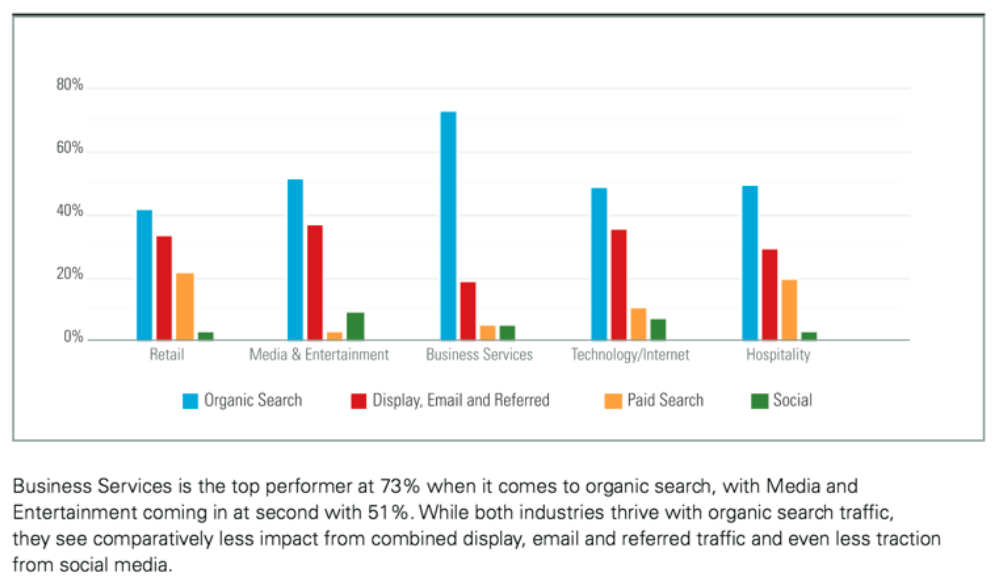
Organic traffic comes into play when the users accessing your content input specific queries into their search engine. The terms they use to define their query cue search engines like Google to hunt for articles that seem most relevant. The unpaid articles that pop up first on your search results page are the ones that search engines determine to be the best match for your needs, and that’s how your organic traffic is born.
It's important to keep in mind that your search engine doesn't match a user query word-for-word. Instead, it takes the user’s search intent into consideration to present them with a SERP (Search Engine Results Page) that satisfies their query’s intent.
That said, sustainable isn’t the same as maintenance-free. Search algorithms change, competitors publish new content, and pages need occasional updates to keep performing — organic growth is a long-term investment, not a set-and-forget one.
That doesn’t mean competitors can’t catch up — they can study your keywords, backlinks, and content just as easily as you can study theirs. But as long as your page keeps serving the query better than the alternatives, it keeps earning traffic without a per-visitor price tag.
How to Get Organic Traffic?
Organic traffic grows when pages match search intent, provide useful information, can be crawled and indexed correctly, and demonstrate sufficient relevance and authority. Keywords help describe the topic, but rankings also depend on content quality, internal linking, backlinks, page experience, competition, and technical accessibility.
Let’s go through 10 practical strategies you can use to grow your organic traffic.
10 Ways to Increase Organic Traffic
From matching your content to what people are actually searching for, to fixing technical issues, strengthening internal links, and earning relevant backlinks — each piece supports the others. Some will apply more than others depending on your site, so use the list below as a practical checklist rather than a strict sequence.
Let’s go through each one.
#1: Match Content to Search Intent
Before writing or rewriting a page, check what’s currently ranking for your target query: are the top results guides, product pages, comparison tables, or something else? That format is a strong signal of what searchers expect. In Serpstat’s keyword reports, you can see the likely intent behind a query alongside its volume and difficulty, so you can prioritize queries your content can realistically satisfy rather than guessing.
#2: Find Keyword Opportunities With Realistic Ranking Potential
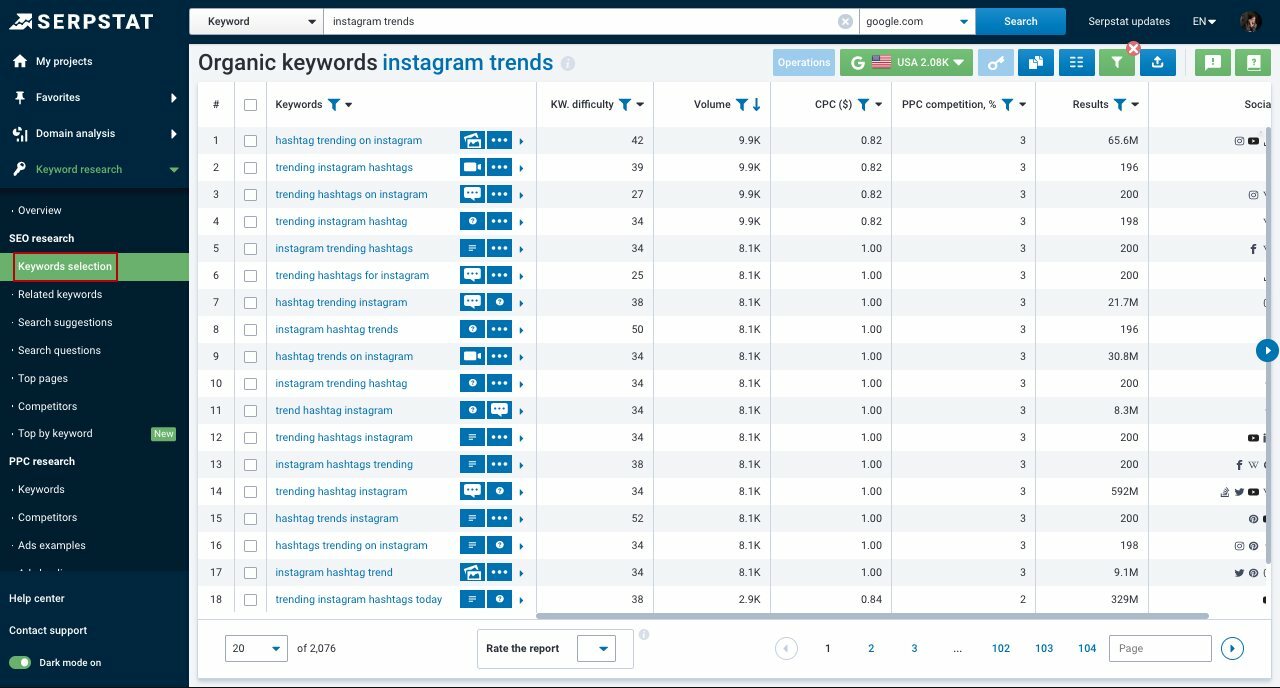
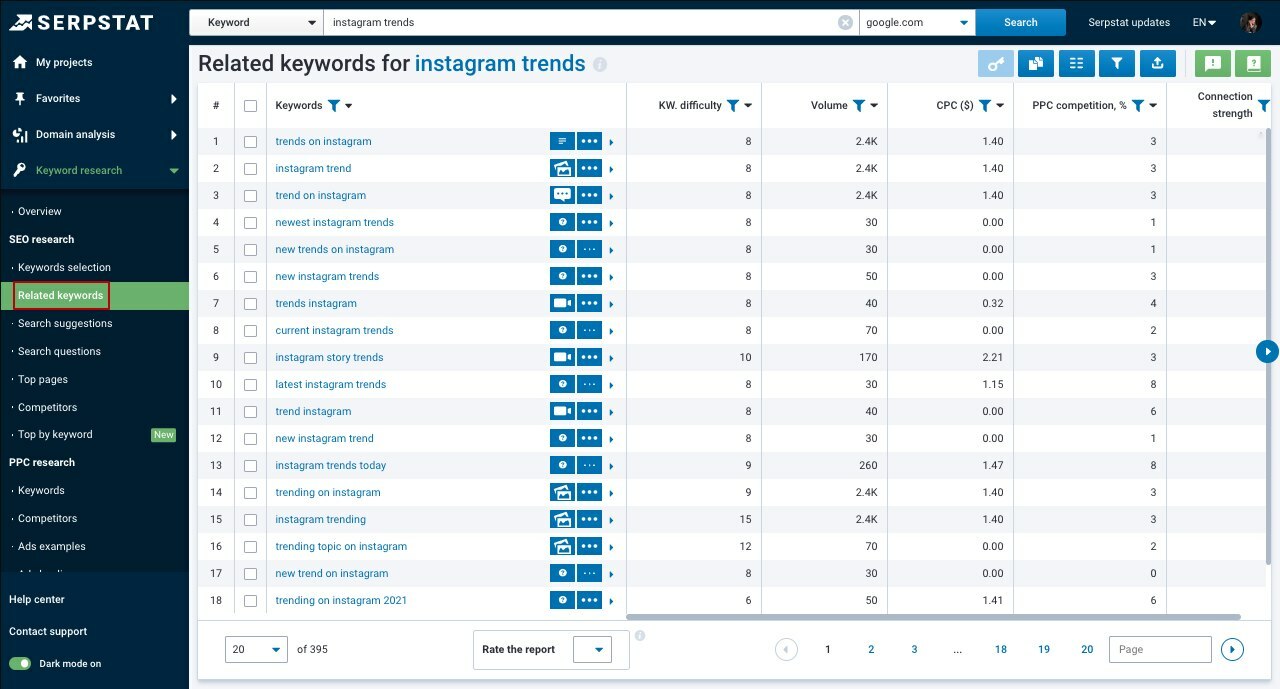
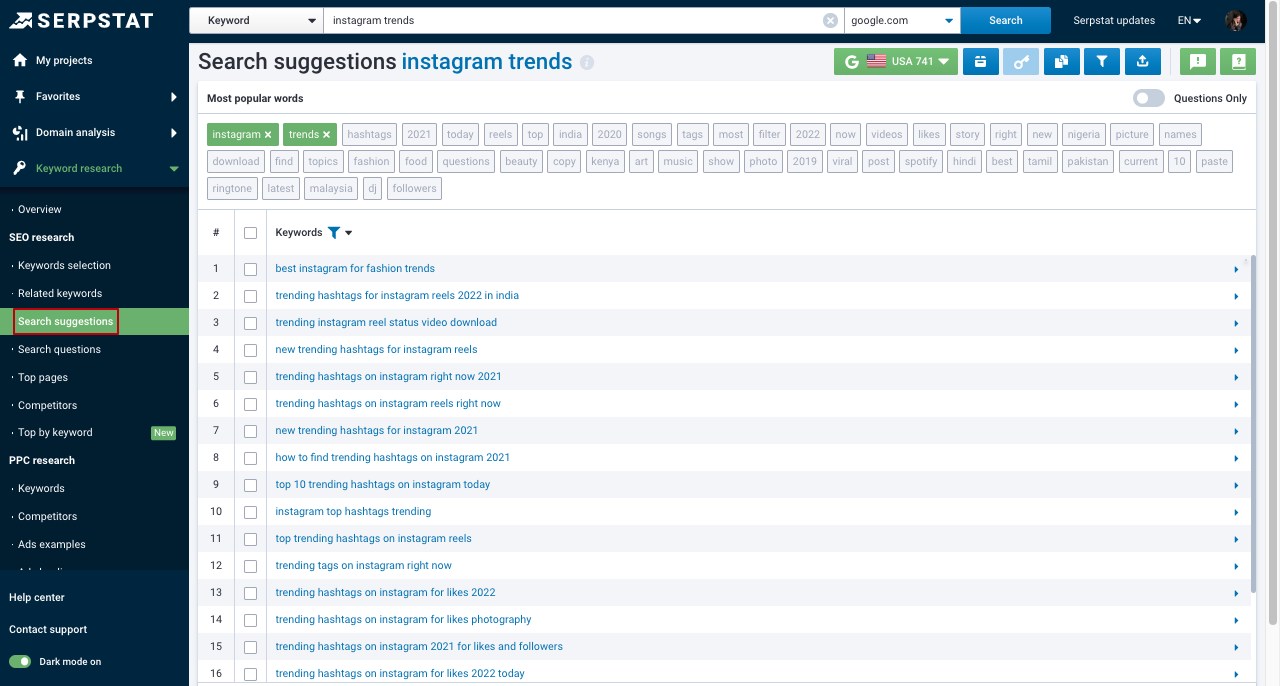
The tool fetches all search terms containing your set keywords. You can see different reports, including:
- "Keywords Selection" report – organic keywords associated with the researched one that domains are ranking for in Google's top-100 results.
- "Related Keywords" report represents all search queries that are semantically related to the searched keyword. This is where you can check and use new variations of the queries.
- "Search Suggestions" report shows the queries offered to users under the search bar.
- "Search Questions" report is where you can see all question forms of search suggestions. These are questions that include a selected keyword that users are looking for an answer to.
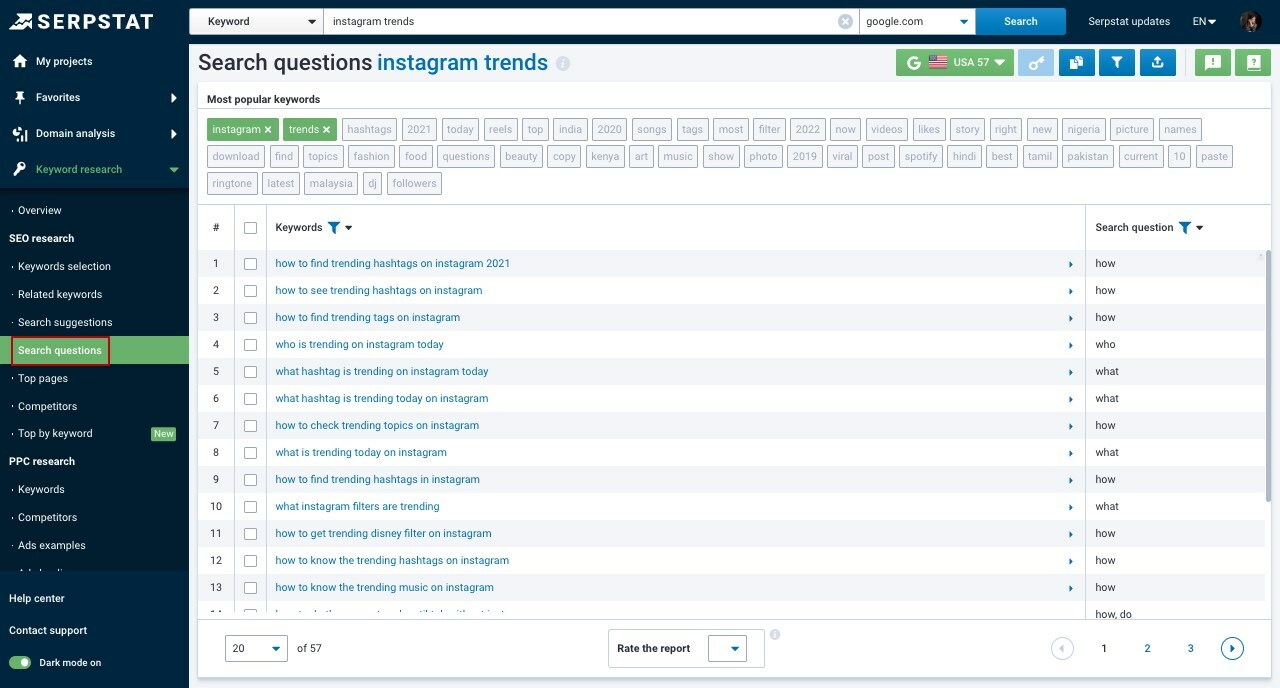
Would you like to make the most out of Serpstat Keyword Research tool?
You can simply try how it works by yourself!
Click the button below to get a free 7-day trial :)
#3: Fix Keyword Cannibalization
To find it, search your own site for a target keyword in Google (site:yourdomain.com keyword) or check which of your URLs rank for the same query in your rank-tracking data. If you find overlap, either merge the weaker page into the stronger one with a redirect, or rewrite each page to target a clearly different intent or subtopic so they stop competing with each other.
#4: Improve Titles and Search Snippets
Rather than following rigid rules, when writing a title:
- Check how competing pages already phrase their titles for the same query;
- Describe the specific benefit or answer your page delivers;
- Avoid simply duplicating a competitor’s title word for word;
- Make sure the title, your H1, and the page’s actual content agree with each other.
Google typically displays 50–60 characters of a title before truncating it, but the cutoff depends on pixel width, not a fixed character count — so treat that as a rough guide, not a hard limit.
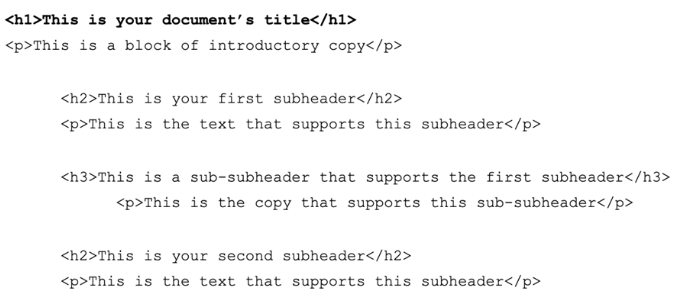
Use <h2> tags for your primary subheadings and <h3>–<h6> for what’s nested under them. Headings exist mainly for structure and navigation — there’s no need to force a keyword into every one of them.
Theoretically, it should look something like this:
A few things to keep in mind when writing one:
- Keep it Casual
- Be Concise
There’s no fixed limit, but Google typically shows somewhere around 150–160 characters before truncating — the exact cutoff depends on pixel width and device, so aim for that range rather than an exact count.
- Use Keywords
You can use the Serpstat Keyword Research tool mentioned earlier, or Keyword Trends, to see which terms and phrasing are currently popular for your city or country.
- Include a CTA
- Don’t Copy Yourself
But by creating brand new meta descriptions, you increase your SERP visibility chances in the long run.
#5: Update Pages That Are Losing Traffic
In Google Search Console’s Performance report, filter by page and sort by trend to spot URLs whose impressions or average position have declined over the last few months. Common causes include outdated information, a competitor publishing a stronger page, a technical change that hurt crawlability, or a shift in how Google interprets the query’s intent.
Once you’ve found a candidate, update the outdated parts, add depth the current top results have that yours doesn’t, and double-check the page’s title, meta description, and internal links still make sense — then track whether the changes actually move the needle before repeating the process elsewhere.
#6: Optimize Pages Ranking in Positions 11–20
Pull a list of your pages ranking in positions 11–20 for their target queries from your rank-tracking data, then prioritize the ones with meaningful search volume. For each one, compare it against the pages currently outranking it: look for missing subtopics, thinner content, weaker internal linking, or a title and meta description that undersell the page, and address whichever gap is largest.
#7: Build a Clear Internal Linking Structure
A few practical habits:
- Link to important pages from your highest-authority pages, not just from the navigation menu;
- Use descriptive anchor text that reflects the linked page’s topic, rather than «click here»;
- Keep priority pages reachable within a few clicks of the homepage;
- Check periodically for orphan pages — pages with no internal links pointing to them at all.
#8: Earn Relevant, High-Quality Backlinks
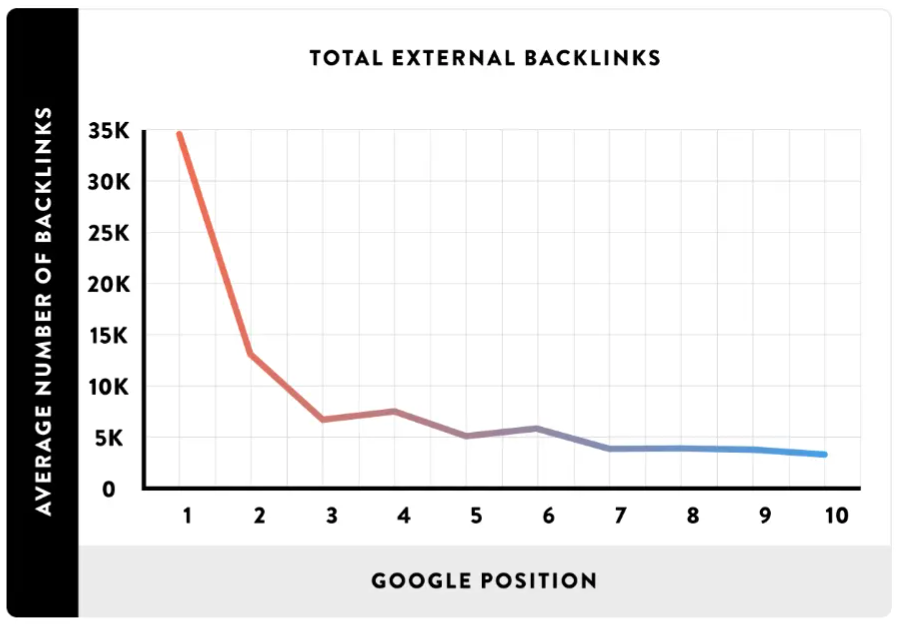
A few practical ways to earn them:
- Create high-quality content that other sites genuinely want to reference.
- Use Google Search Console’s Top Linking Sites report to see what content already attracts links, and produce more like it.
- Analyze where your competitors get their backlinks and reach out to the same sources.
- Find and fix your competitors’ broken links by offering your own page as a replacement.
- Publish original research or data that other sites want to cite.
- Get mentioned through digital PR or relevant industry roundups.
#9: Improve Technical Health: Crawlability, Indexability & Site Speed
There are a few common reasons a page runs slowly, including:
- Poor-quality or overloaded hosting.
- Too many unoptimized HTTP requests.
- Unminified or render-blocking code.
- Large, uncompressed images and media.
- Excessive third-party scripts and ads.
- Outdated CMS tools.
- No CDN in front of the site.
Checking your site’s technical health is easier with the Site Audit tool from Serpstat — it flags issues like broken links, missing meta tags, slow-loading pages, duplicate content, and crawl errors, and points to what to fix first.
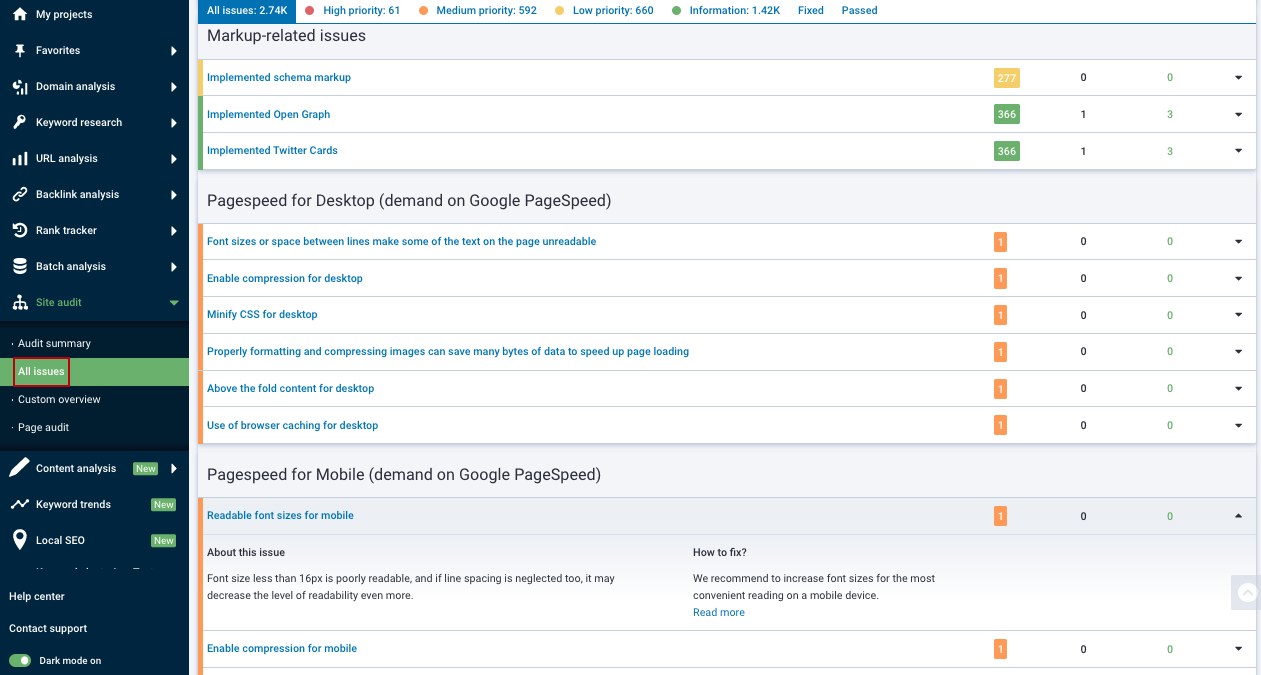
Want to learn how to fix on-site issues and boost your Google rankings with the Site Audit tool?
Follow the link below, and sign up for a free 7-day trial
- Use Modern, Responsive Images
- Reduce Your HTML, CSS, and JavaScript Presence
- Use an Appropriate CDN
- Check Your Mobile Experience
- Confirm Pages Can Be Crawled and Indexed
#10: Track Results in Google Search Console
Check both regularly rather than only after a big change: a steady habit of reviewing Search Console is what turns these strategies into a repeatable process instead of a one-time cleanup.
Key Takeaways
Speed up your search marketing growth with Serpstat!
Keyword and backlink opportunities, competitors' online strategy, daily rankings and SEO-related issues.
A pack of tools for reducing your time on SEO tasks.

Discover More SEO Tools
Backlink Cheсker
Backlinks checking for any site. Increase the power of your backlink profile
API for SEO
Search big data and get results using SEO API
Competitor Website Analytics
Complete analysis of competitors' websites for SEO and PPC
Keyword Rank Checker
Google Keyword Rankings Checker - gain valuable insights into your website's search engine rankings
Recommended posts
Cases, life hacks, researches, and useful articles
Don’t you have time to follow the news? No worries! Our editor will choose articles that will definitely help you with your work. Join our cozy community :)
By clicking the button, you agree to our privacy policy.
Thank you, we have saved your new mailing settings.