• Find categories and pages your site needs
• Group keywords by search intent and SERP similarity
• Compare competitor website structures
• Reduce keyword cannibalization
• Build a scalable page hierarchy
Build an SEO-Friendly Website Structure
Follow these easy steps to create the site structure






Collect seed keywords
Start your free 7-day trial and build a clearer website structure with Serpstat.
Expand the keyword list
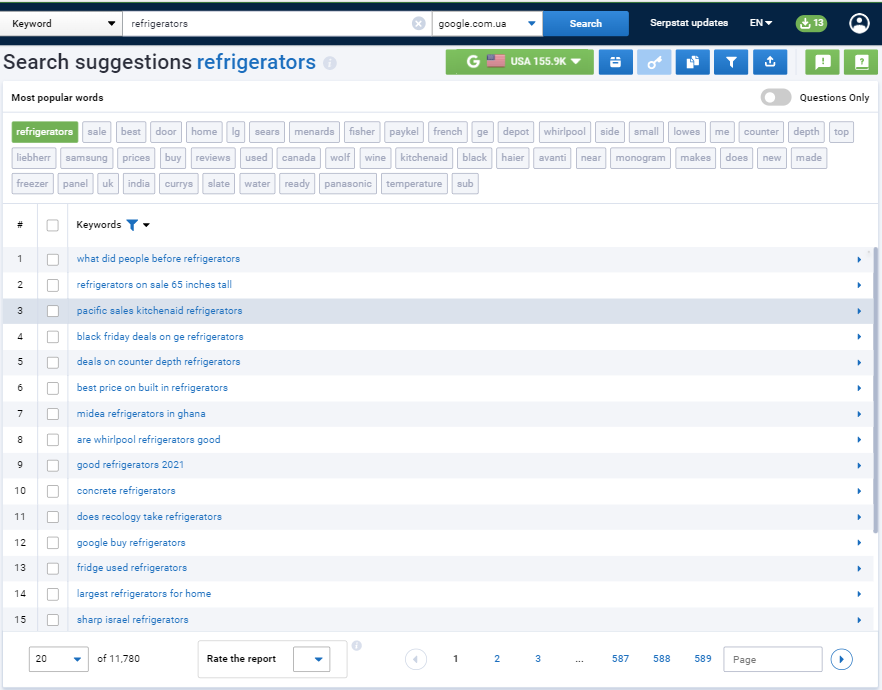
Search suggestions & questions
Search suggestions are keywords that a search engine suggests when a user starts typing. The data is displayed in real time. To collect search suggestions, follow these steps:
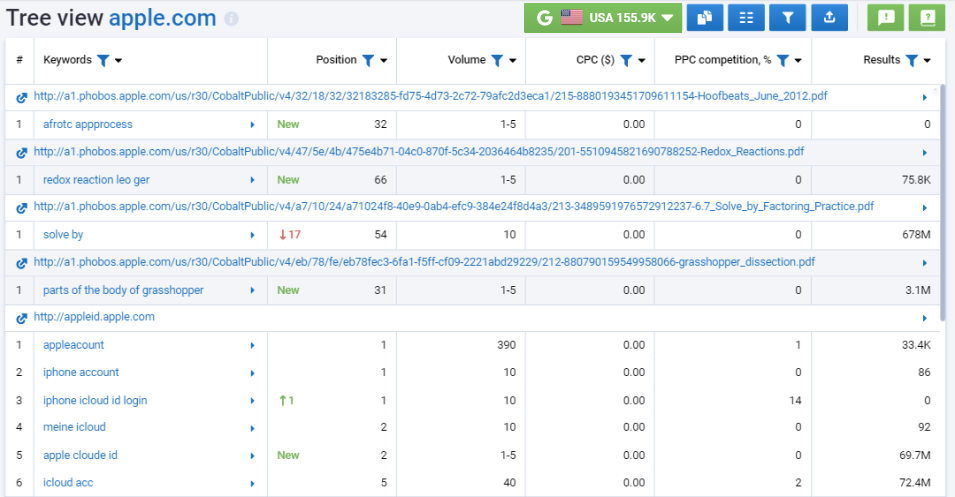
Analyze competitor website architecture
Enter a domain to see its page structure, keywords per URL, estimated traffic, and where it ranks in the top 100 Google results. Use this data as a reference, then validate each section against your own products, audience, and search demand.
Cluster keywords and map them to pages


What Serpstat helps you do

Powered by Serpstat

Need help with a large website or a custom workflow? Book a free 30-minute consultation.

Build a Logical, SEO-Friendly Website Structure with Serpstat






FAQ. Common questions about creating a site structure
1. What is website structure?
Website structure is the way pages, categories, and sections are organized and connected. A clear structure helps users navigate the site and helps search engines discover and understand important pages.
2. Why is site structure important for SEO?
A logical structure helps search engines crawl and index your pages, distributes keywords across pages without overlap, and makes it easier for users to find what they need. This can improve rankings, reduce keyword cannibalization, and increase organic traffic.
3. How do you plan a website structure?
Planning a website structure consists of the following stages:
- Step 1. Collect seed keywords.
List the products, services, categories, and topics your site needs to cover. - Step 2. Expand and analyze competitors.
Expand your keyword list with related terms and search suggestions, then use a tool like Tree View to see how competing websites organize the same topics. - Step 3. Cluster keywords.
Group keywords by meaning and SERP similarity. Each cluster can become a category, landing page, product page, or article. - Step 4. Map clusters to pages.
Assign each cluster to an existing or planned URL, then arrange the pages into a hierarchy that is easy for both users and search engines to navigate.
4. What is keyword mapping?
Keyword mapping is the process of assigning each keyword or keyword cluster to a specific existing or planned page. The result is a keyword-to-page map that shows what every page should target and where new pages are needed.
5. How does keyword clustering help build a site structure?
Keyword clustering groups keywords by meaning and SERP similarity so you don't create separate pages for minor keyword variations. Each cluster points to one page, which reduces keyword cannibalization, clarifies page-level intent, and makes it easier to plan categories and subcategories — even for projects with tens of thousands of keywords.
6. How deep should a website structure be?
There's no fixed number of levels that works for every site. Keep important pages easy to reach through clear navigation and contextual internal links, use short and descriptive URLs that reflect a page's place in the hierarchy, and design a structure that can expand without breaking existing categories or creating duplicates.
7. How can Serpstat analyze competitor site architecture?
Enter a competitor's domain into the Tree View tool to see its page structure, the keywords each URL ranks for in the top 100 Google results, and estimated traffic by page. Use this data as a reference point, then validate each section against your own products, audience, and search demand.